Reversing dart compile exe on macOS: Bringing blutter to Dart Standalone AOT Binaries

The problem
You receive a suspicious macOS binary that opens in Binary Ninja as thousands of anonymous stripped functions with no relevant imports, no readable strings, and no obvious entry point, and when you run strings all you get is libSystem, some pthread calls, and standard libc with nothing that explains what the binary actually does. Then you notice something:
1
2
3
4
5
$ strings ./binary | grep -i dart
kDartVmSnapshotData
kDartIsolateSnapshotData
Dart VM
DART_VM_OPTIONS
What you found is a standalone Dart executable produced by dart compile exe, not a Flutter app or an Android libapp.so, but a self-contained macOS binary that ships its own Dart VM runtime statically linked inside it.
In November 2024, Jamf Threat Labs documented DPRK-linked malware built with Flutter for macOS. The malicious code was hidden inside a Dart dylib, invisible to standard analysis tools by design. That case involved Flutter applications, where blutter works, but this post covers a different and more opaque case: standalone executables produced by dart compile exe with no Flutter framework, no app bundle, no visible dylib, just a single binary where the app code is embedded as opaque data inside an LC_NOTE with no public analysis method to extract it.
Scope: All analysis in this post was performed on Dart 3.11.4 standalone AOT binaries compiled for macOS ARM64. The extraction method and blutter patches are specific to this format. Flutter applications on Android and iOS use a different layout and are already supported by upstream blutter without modifications.
This is where existing tools stop working, because blutter, the go-to tool for Dart AOT reverse engineering, supports Android libapp.so and iOS App.framework but has no support for this format.
This post documents how to get blutter working on standalone Dart AOT binaries on macOS, including the binary format, the extraction method, the necessary patches, and the complete analysis workflow.
The binary format
When you compile a Dart program with dart compile exe, the result is not a conventional executable. It is a two-level structure: a binary that carries another binary inside itself as opaque data.
The outer level is the Dart VM runtime, statically linked into the binary, and it is what appears when you open the file in Binary Ninja: thousands of anonymous functions covering the full runtime infrastructure, including the garbage collector, thread scheduler, and type system. By itself, this code does nothing useful, because its only purpose is to load and execute what is hidden inside.
The inner level is your compiled app, a valid ARM64 dylib containing real machine code with no bytecode and no interpreter, but unlike a normal dylib it never goes through the dyld because it lives hidden inside a load command called LC_NOTE, named __dart_app_snap.
LC_NOTE is neither a segment nor a section, but a named pointer to an arbitrary blob of bytes somewhere inside the file that the dyld reads, ignores, and moves on from without taking any action. Only the Dart VM runtime knows to seek to that offset, extract the bytes, and load them as a Mach-O into memory.
You confirm this with a single command:
1
otool -l ./binary | grep -A5 "__dart_app_snap"
1
2
3
data_owner __dart_app_snap
    offset 4571136
      size 932512
Two fields, an offset and a size, and that is all the Dart VM needs to locate and load your app at runtime.
That is why Binary Ninja cannot see your app’s code: BN parses the LC_SEGMENT_64 load commands of the outer binary and maps only the VM runtime segments, and since LC_NOTE carries no memory mapping semantics, BN has no way to know that inside those 932512 bytes there is a complete ARM64 dylib containing your compiled code.
Your app’s code is there, but invisible to any tool that analyzes the binary through the conventional Mach-O structure.
 The inner Mach-O opened in Binary Ninja before symbol import; all functions anonymous
The extraction
Now that you understand the format, the path is straightforward: the inner Mach-O is in the file and you just need to know where it starts and what its size is.
otool -l already gave you that information:
1
otool -l ./binary | grep -A5 "__dart_app_snap"
1
2
3
data_owner __dart_app_snap
    offset 4571136
      size 932512
Three lines of Python extract the inner Mach-O:
1
2
3
4
5
6
with open('./binary', 'rb') as f:
    f.seek(4571136)
    data = f.read(932512)

with open('./inner.macho', 'wb') as f:
    f.write(data)
Confirm it is a valid Mach-O:
1
2
file ./inner.macho
# Mach-O 64-bit dynamically linked shared library arm64
It is a legitimate ARM64 dylib with exported symbols:
1
2
3
4
5
nm ./inner.macho | grep kDart
# _kDartVmSnapshotInstructions
# _kDartVmSnapshotData
# _kDartIsolateSnapshotInstructions
# _kDartIsolateSnapshotData
These four symbols are what blutter needs to locate the app code inside the snapshot. They point to the four fundamental sections of the Dart AOT snapshot:
_kDartVmSnapshotInstructions: compiled VM runtime code_kDartVmSnapshotData: VM runtime data_kDartIsolateSnapshotInstructions: your app’s code: this is wheremain()lives_kDartIsolateSnapshotData: object pool: strings, constants, references
Now you have the inner Mach-O in hand, but the next problem is that blutter does not accept this format directly.
The ELF wrapper
Blutter was built to analyze two formats: Android libapp.so an ELF ARM64 and iOS App.framework/App, a Mach-O ARM64 Flutter dylib. The inner Mach-O you extracted is technically similar to the iOS format, but blutter does not support standalone dart compile exe binaries. When you try to run it directly, the error is clear:
1
2
python3 blutter.py ./inner.macho ./out --dart-version 3.11.4_ios_arm64
# Cannot find libapp file
The problem is structural: blutter for iOS expects an App.framework/App in a specific directory structure, for Android it expects a libapp.so, and neither path accepts a standalone Mach-O extracted from an LC_NOTE.
The solution is to give blutter exactly what it expects rather than rewriting it, which means producing an ELF ARM64 with the four snapshot symbols in the right place.
Why ELF and not Mach-O
Blutter has a complete and functional ELF parser, whereas the Mach-O parser has bugs for Dart 3.11.x that you will encounter in the patches section, so the cleanest approach is to feed blutter an ELF and use the path that works rather than trying to fix the one that is broken.
The blutter constraint
Blutter accesses snapshot data like this:
1
vm_snapshot_instructions = elf_base_ptr + symbol_value;
It adds the base pointer of the mapped file to the symbol value. For this to work, the symbol value must be a file offset, not a virtual address. This holds when the ELF LOAD segment has p_vaddr=0 and p_offset=0, which is the default in Android libapp.so.
The synthetic ELF structure
The ELF you will create has a simple layout:
1
2
3
4
5
6
7
0x0000: ELF header (64 bytes)
0x0040: LOAD program header (56 bytes)
0x1000: inner Mach-O data
  ... : .dynsym (dynamic symbol table)
  ... : .dynstr (symbol name strings)
  ... : .shstrtab (section name strings)
  ... : section headers
The LOAD segment covers the entire file with p_vaddr=0 and p_offset=0. The four snapshot symbols point to file offsets within the inner Mach-O, calculated as macho_vaddr + 0x1000, where 0x1000 is the padding before the data.
The extract_snapshot.py script in the repository does all of this automatically, it reads the outer binary, extracts the inner Mach-O, reads the symbols via nm, and builds the synthetic ELF with the correct offsets:
1
2
3
4
python3 extract_snapshot.py ./binary /tmp/analysis/
# [+] Inner Mach-O: Mach-O 64-bit dynamically linked shared library arm64
# [+] Symbols found: 4/4
# [+] ELF wrapper: /tmp/analysis/dart_snapshot.so
With the ELF in hand blutter has what it needs, though it still requires patches to support Dart 3.11.x and the macos_arm64 target.
Patching blutter
The current version of blutter supports Dart up to 3.11.1 for Android and iOS. To analyze a Dart 3.11.4 binary compiled for macOS, you need to apply four patches across different files in the codebase.
Before applying any patch, confirm the Dart version in the binary:
1
2
strings ./binary | grep -E "[0-9]+\.[0-9]+\.[0-9]+ \(stable\)"
# 3.11.4 (stable) (Tue Mar 24 01:02:20 2026 -0700) on "macos_arm64"
Note the version: you will need it in the blutter command.
Patch 1: scripts/CMakeLists.txt
Blutter only accepts android or ios as TARGET_OS. When you pass macos_arm64, CMake fails immediately:
1
FATAL_ERROR "Only android or ios platform"
Dart macOS uses DART_TARGET_OS_MACOS without the _IOS suffix. If you use the ios target, blutter compiles with DART_TARGET_OS_MACOS_IOS and the snapshot rejects it because it was compiled for macos, not ios:
1
Snapshot not compatible: snapshot requires 'macos' but VM has 'ios'
The patch adds macos as a valid target with the correct defines:
1
2
elseif(${TARGET_OS} STREQUAL "macos")
    set(target_os "DART_TARGET_OS_MACOS")
Patch 2: dartvm_fetch_build.py
Blutter assumes macos uses compressed pointers the same as Android. But standalone macOS Dart uses no-compressed-pointers. The snapshot rejects it:
1
2
Snapshot not compatible: snapshot requires 'no-compressed-pointers'
but VM has 'compressed-pointers'
The patch fixes the default for macOS:
1
self.has_compressed_ptrs = os_name not in ('ios', 'macos')
Note: The
no-compressed-pointersbehavior is specific todart compile exestandalone binaries on macOS. Flutter applications compiled for Android use compressed pointers by default. This patch should not affect Android or iOS builds.
Patch 3: blutter/src/ElfHelper.cpp
Two bugs in this file.
Bug 3a - The mach_o.h include was commented out with the note “old dart version has no mach_o.h”. In Dart 3.11.x the header exists at packages/include/dartvm3.11.4/platform/mach_o.h. Without this include, the Mach-O parsing code does not compile:
1
2
3
4
5
// before
//#include <platform/mach_o.h>

// after
#include <platform/mach_o.h>
Bug 3b: The MH_MAGIC_64 case in the Mach-O parser switch had an invalid return, it returned a bool from a function that returns LibAppInfo. It was a merge artifact from a previous PR. The fix is simple:
1
2
3
4
5
6
7
// before
case dart::mach_o::MH_MAGIC_64:
    return size >= sizeof(mach_o::mach_header_64);

// after
case dart::mach_o::MH_MAGIC_64:
    break;
Bug 3c: The synthetic ELF is being passed to a build compiled with DART_TARGET_OS_MACOS. The code always took the Mach-O path. The patch detects the ELF magic before attempting to parse as Mach-O:
1
2
3
4
if (memcmp(elf, "\x7f" "ELF", 4) == 0) {
    return findSnapshots(elf);
}
// continues with Mach-O path
Patch 4: blutter/src/Disassembler_arm64.h
CSREG_DART_HEAP was inside an #ifdef DART_COMPRESSED_POINTERS block. The macOS binary uses no-compressed-pointers, so DART_COMPRESSED_POINTERS is not defined, but the HEAP_BITS register exists on ARM64 regardless. Code using CSREG_DART_HEAP outside the ifdef caused a compilation error:
1
error: use of undeclared identifier 'CSREG_DART_HEAP'
The fix moves the declaration outside the ifdef:
1
2
3
4
5
6
7
// before
#if defined(DART_COMPRESSED_POINTERS)
constexpr arm64_reg CSREG_DART_HEAP = ToCapstoneReg(dart::HEAP_BITS);
#endif

// after
constexpr arm64_reg CSREG_DART_HEAP = ToCapstoneReg(dart::HEAP_BITS);
Applying the patches
All patches are in the repository as a single diff:
1
2
cd /path/to/blutter
git apply /path/to/blutter-macos/patches/macos_standalone_aot.patch
After applying, run blutter with the synthetic ELF:
1
2
3
4
python3 blutter.py \
    /tmp/analysis/dart_snapshot.so \
    /tmp/analysis/blutter_out \
    --dart-version 3.11.4_macos_arm64
If everything went well:
1
2
3
4
5
6
libapp is loaded at 0x104718000
Dart heap at 0x0
Analyzing the application
Dumping Object Pool
Generating application assemblies
Generating Frida script
Running it
After blutter finishes, the output directory has this structure:
1
2
3
4
5
6
7
8
blutter_out/
├── asm/
│   └── file:/path/to/main.dart    ← your app's code with real names
├── blutter_frida.js               ← Frida hooks for all recovered functions
├── ida_script/
│   └── addNames.py                ← imports symbols into IDA or Binary Ninja
├── objs.txt                       ← list of recovered Dart objects
└── pp.txt                         ← complete object pool dump
asm/: the recovered code
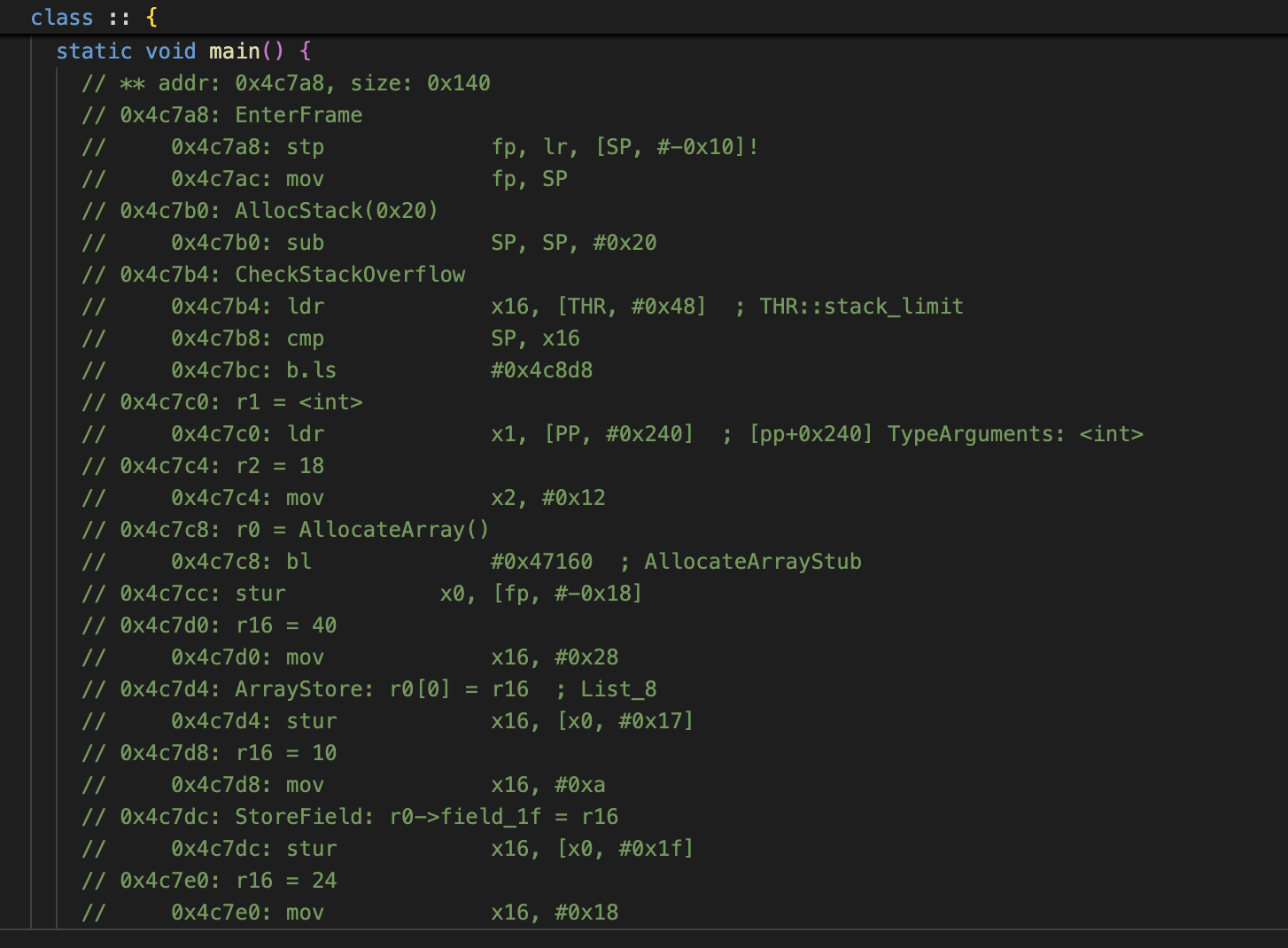
This is the most important output, because blutter generated high-level pseudocode for every function in your app with class and method names recovered from the snapshot, so instead of seeing only sub_xxxxxxxx you now see:
1
2
3
4
5
6
7
8
// ** addr: 0x4c7a8, size: 0x140
static void main() {
    // 0x4c7a8: EnterFrame
    //     stp fp, lr, [SP, #-0x10]!
    // [pp+0x1750] " é par"
    // [pp+0x1758] " é impar"
    // r0 = printToConsole()
}
The address 0x4c7a8 is relative to the start of IsolateSnapshotInstructions. To convert to the real offset in the inner Mach-O:
1
inner_macho_offset = blutter_addr - FILE_DATA_OFFSET  # 0x4c7a8 - 0x1000
pp.txt: the object pool
The object pool contains all program constants including strings, numbers, and class references, and it is the first thing to read in a malware analysis because it reveals IOCs without needing to understand the assembly:
1
grep "String:" blutter_out/pp.txt | grep -v "dart:"
Here is a real excerpt from the pp.txt of the binary analyzed in this post, showing how the app’s strings appear alongside Dart stdlib constants:
1
2
3
4
5
6
[pp+0x1748] String: "function result"
[pp+0x1750] String: " é par"
[pp+0x1758] String: " é impar"
[pp+0x1760] String: ": "
[pp+0x1768] String: " ("
[pp+0x1770] String: ")"
The strings at pp+0x1750 and pp+0x1758 are the app’s own strings, recognizable because they are surrounded by generic runtime constants. Any C2 URLs, LaunchAgent paths, or hardcoded keys that exist in the Dart code will appear here in plaintext alongside similar stdlib noise.
blutter_frida.js: dynamic analysis
Blutter generates a Frida script with hooks on all recovered functions with the addresses already calculated:
1
2
3
4
5
Interceptor.attach(base.add(0x4b7a8), {
    onEnter(args) {
        console.log("main() called");
    }
});
To use:
1
frida -f ./binary --no-pause -l blutter_out/blutter_frida.js
Importing symbols into Binary Ninja
Open the inner Mach-O directly in Binary Ninja rather than the outer binary:
1
File → Open → /tmp/analysis/inner.macho
In the BN Python Console, run the import script:
1
2
3
4
exec(open('/path/to/blutter-macos/scripts/import_symbols_bn.py').read())
# [+] Functions added: 312
# [+] Symbols named:   287
# [✓] Done
You can now navigate to main() by name, see cross-references, and analyze the control flow with full context.
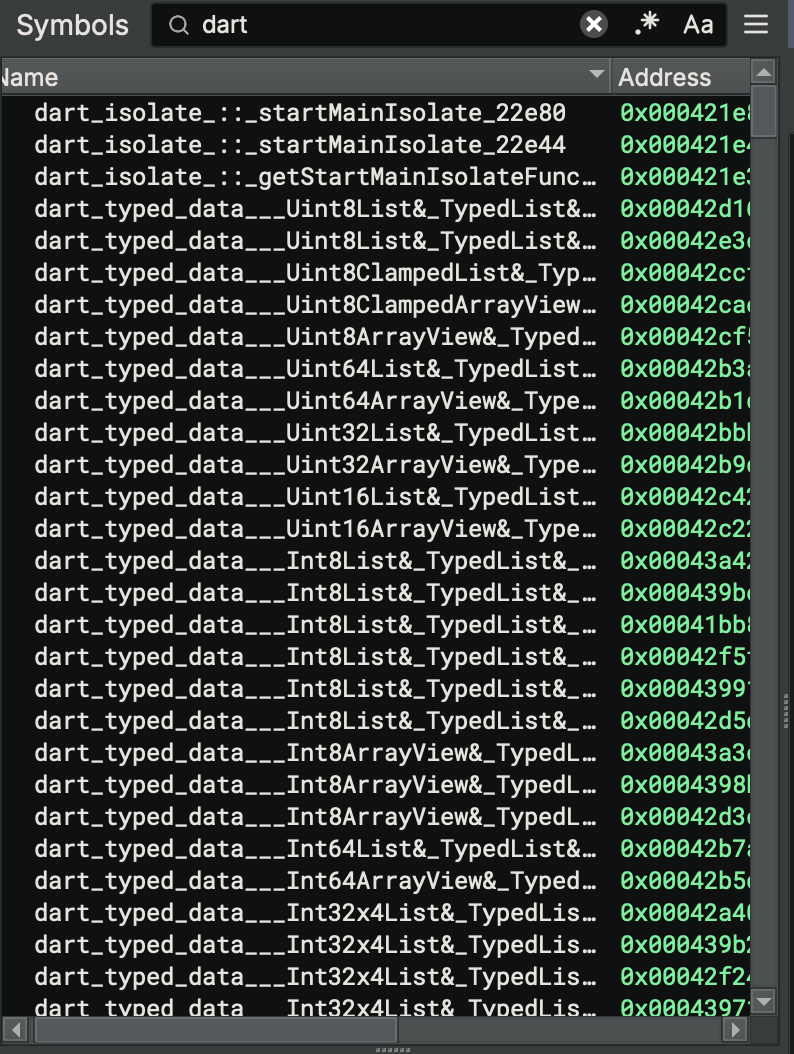 1558 Dart symbols recovered by blutter, dart_isolate, dart_typed_data, and all stdlib functions named
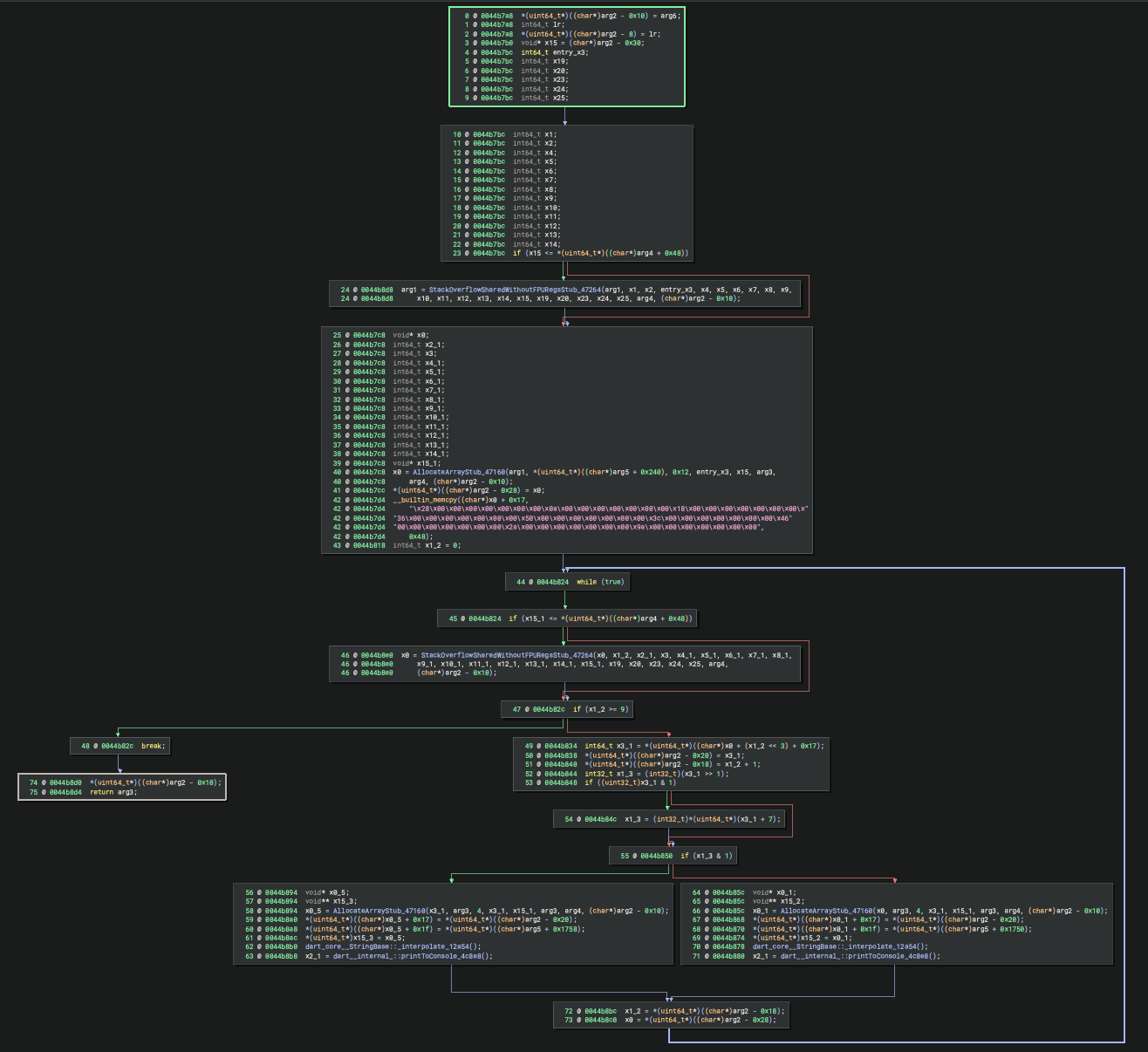 main() decompiled with dart_internal_::printToConsole and dart_core_StringBase::_interpolate visible
Hunting and triage
Identifying dart compile exe binaries in the wild requires different indicators than those used for Flutter applications, because the two formats have a fundamentally different Mach-O structure.
Static indicators
The most reliable indicator is the LC_NOTE load command with the name __dart_app_snap, which unlike strings that may vary between Dart versions is hardcoded in the Dart VM and does not change across releases, meaning any tool that parses Mach-O load commands will find it:
1
otool -l ./binary | grep "__dart_app_snap"
The four snapshot symbols exported from the outer binary serve as a secondary indicator, and a dart compile exe binary will always export all four while a Flutter macOS application exports none from the outer binary because they live inside App.framework:
1
nm ./binary | grep -E "kDartVmSnapshot|kDartIsolateSnapshot"
Differentiating from Flutter
The fastest structural check is the presence or absence of a Flutter framework dependency, because dart compile exe binaries have no reference to FlutterMacOS.framework while Flutter macOS apps always do:
1
2
3
4
5
6
7
# dart compile exe — no Flutter framework dependency
otool -L ./binary | grep -i flutter
# returns empty

# Flutter macOS app — references FlutterMacOS.framework
otool -L ./app | grep -i flutter
# /path/to/FlutterMacOS.framework/Versions/A/FlutterMacOS
If otool -L returns no Flutter reference and the four snapshot symbols are present, the binary is a standalone dart compile exe executable.
Triage workflow
Once a candidate is identified, the object pool dump produced by blutter is sufficient for a first-pass triage without requiring full assembly analysis, because running extract_snapshot.py followed by a grep on the string entries of pp.txt surfaces the app’s own strings directly from the inner Mach-O:
1
2
python3 extract_snapshot.py ./binary /tmp/analysis/
grep "String:" /tmp/analysis/blutter_out/pp.txt | grep -v "dart:"
C2 URLs, filesystem paths, and hardcoded values will appear here in plaintext, and because this is purely static analysis of the inner Mach-O it is not affected by anti-sandbox techniques that suppress dynamic behavior, so full blutter analysis and assembly review are reserved for samples where the object pool triage reveals suspicious content or where sandbox behavioral analysis is inconclusive.
Conclusion
Before this work, dart compile exe binaries on macOS represented a blind spot where the app code is hidden inside an LC_NOTE as opaque data that no conventional analysis tool can see, and blutter, the only tool capable of recovering symbols from a Dart snapshot, had no support for this format.
This post documents the first public method for complete analysis of dart compile exe binaries on macOS, including:
- Extraction of the inner Mach-O from the
LC_NOTE - Construction of a synthetic ELF to feed blutter
- Four compatibility patches for Dart 3.11.x and the
macos_arm64target - Symbol import into Binary Ninja for complete analysis
The blutter-macos repository contains all scripts and patches needed to reproduce the method on any dart compile exe binary.
During the format analysis a side effect became evident: the mechanism Dart uses to load the inner Mach-O is functionally equivalent to an undocumented evasion technique. The combination of LC_NOTE as an opaque container, MAP_JIT for execution without dyld, and direct syscall in the payload produces an artifact where the code loading phase is invisible to static analysis and runtime module enumeration. The full implications for detection and incident response will be explored in the second post.
This combination, LC_NOTE Reflective Execution (LRE), is not documented in any public article or tool and is a candidate for the first macOS sub-technique of T1620 in MITRE ATT&CK.
The second post in this series will explore LRE in depth, covering the complete PoC, the comparison with existing techniques, and the implications for detection and incident response.
Resources
- Repository: github.com/MachineCase/blutter-macos
- Original blutter: github.com/worawit/blutter
- MITRE ATT&CK T1620: attack.mitre.org/techniques/T1620
- Ping’s Flutter RE series: blog.tst.sh/reverse-engineering-flutter-apps-part-1
- Patrick Wardle: Reflective Code Loading macOS: objective-see.org/blog/blog_0x7C.html
- Jamf Threat Labs: APT Actors Embed Malware within macOS Flutter Applications: jamf.com/blog/jamf-threat-labs-apt-actors-embed-malware-within-macos-flutter-applications